Sunday, September 29, 2013

Rate Your System II

1) Go to Control panel
and click on system and security.
2) Then check the Windows Experience Index.
3) your system could be already rated, but if not click rate my system, you need a permission form the system to run this, Click this only if you are the administrator/owner of the computer. NOTE: It's strongly recommended to close any other applications before running this program, this may cause the system to overheat.


After the process is complete, some numbers should come up, these numbers mean that what are the capability and how well can your system can handle programs. The higher the score is the better/smoother your system can run. Base score, which is your minimum Subscore, determines what is the maximum performance that you system could do, always purchase applications with lower score than base score. If your score is 1.5~2.7 you should be fine running basic features, but for more features you will probably need a score of 3.5 or higher; I personally recommend purchase computers with a score of 4.0 or higher. 
Note:If you already have run the test, there is no other need to re-run the assessment unless you have changed some important parts of your computer.


Now that you know  your score, let's see how you can know what an application minimum and recommended requirement is. I'm going to go to start menu> Games>and click your specified game one-click ONLY, now click the Performance icon and compare the ratings. If your application is a copied form, the ratings may not show up.
For previous chapter click here.
**This is post is only about a way to detect your computes capability, there are other ways to detect, by knowing your RAM, Processor,Video card and more, the information above may not be completely accurate, for more information contact a professional.**

Thursday, September 26, 2013

Rate your computer. Vista/7


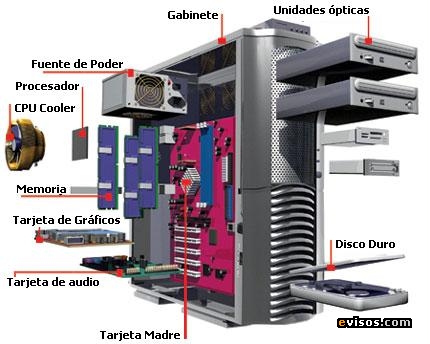
Lets backup from making better performance for a while. Lets say you have an outstanding computer abilities, but you don't know it! With knowing what abilities your computer you could hold you can know what games/applications to run. To run these programs smoothly you need to have four great-quality items. CPU whee how fast your computer could calculate per second. low cpu leads to overheating  computer and may damage the system. RAM Which holds the memory of all application running at that time, Video card to run games smoothly, low quietly video cards cannot even load graphic consuming games, and last but not least, at least 100GB of hard drive. if your computer is less than 15% free, the system might become corrupt and loss some of its data, For more info about these devices click here. There is an program pre-installed on your windows WEI which cam determines your computers performance on programs.
      To start rating your system, go to control panel > system and security> view amount of of ram and processor speed and click on windows experience/ or rate my system. You might need to be the administrator of the computer. Do Not try this at public computers. This  could take about 3~5 minutes and could be a heavy process, so do not run any other applications while this is processing. You should get a score of your computes performance. Your score will be determined by the lowest of them(meaning thats the maximum quality that your computer could hold) And will be known as Subscore.

Scores:
  • There will be a lot of differences between the WEI in Windows Vista and Windows 7, but you can still use the score as a guideline for upgrading. When reviewing your score, keep these things in mind:
    • If your overall WEI score is 2.0 or higher, you should be able to run Windows 7 reasonably well — although Glass will turn on only if the score is higher.
      You need a considerably higher score if you’re going to use the PC for heavy graphics or gaming. But a 2.0 is fine for Web browsing, light word processing, and the like.
  • If your Graphics score (the one marked Desktop Performance for Windows Aero) is 3.0 or higher, Windows 7 will turn on its Glass interface.
  • When you want to play games always look at the minimum and the recommended  scoring of it. If it's lower than your subs-core you are allowed to play, otherwise your system cannot load the game.

So now that we know what your system could do, we can now change the setting on your computer to run games better or have a smoother performance, but we will start with better quality then perofmance. To Continue click here.


Tuesday, September 24, 2013

Private links and Overview

There are some pages that are hidden and only accessible through links; you might miss them thinking they are another website; video tutorials are primarily in private links, so if the link stated it's going to show more info(Visual) then it's probably part of "Virtual World's" blog, unless otherwise stated. To access of all of the links, click here to continue!


           Another topic to cover is about "Blog Overview", B.O. page talks about different updates/Version that occurred to this blog, and visitors have a basic idea of what has been updated. If they don't like it, they can ask the owner to change or remove it. The layout of that page has been more organized and more advanced. Feel free to visit there anytime you want.